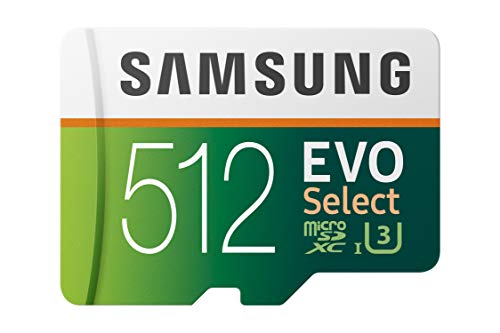
The genuine Samsung Evo Select line of Micro SD cards are great. They are reliable and they live up to the speed and capacity classifications they claim to. I've been using Samsung cards for years and they are the only brand that consistently doesn't give me any issues year after year.
This 32GB card is no exception. However, by default the card is formatted as FAT32, but I prefer exFAT as FAT32 won't allow you to transfer a folder containing more than 4GB to the card. That's annoying if you are moving data from an old card to a new one. FAT32 has 4GB file size limitations, but on a transfer it recognizes a directory containing lots of files as 1 thing, and applies the 4GB limit. This will give you an error (in Windows anyway) that there isn't enough space available for the transfer. But if you copy the files individually it works fine. Or just format the card to exFAT and it will accept the folder that exceeds 4GB easily. exFAT will work just fine in an Android phone as well (Android 5.1 or higher. Earlier versions may have some issues with the exFAT formatting)
This card handles full HD Video at 60FPS without faulting. It's write speeds are fine to use for HD video.
But be sure to authenticate the card upon arrival to make sure it's a genuine Samsung card with the stated capacity. Micro SD cards are a favorite thing for fraudsters to counterfeit because it's cheap and easy to do it. In the past the regular Evo line of Samsung cards (the white and orange colored ones) where the popular cards to counterfeit. Though with these higher grade cards (Evo Select line with the white and green color scheme) starting to be more popular......well it behooves anyone buying a new SD card to check it's authenticity upon arrival. The 2 tone fade of the green coloring adds an additional anti-counterfeiting measure over the previous solid colors. This makes it more expensive to counterfeit a Samsung card convincingly.
What happens is that fraudulent card makers will take a 4GB Class 1 card that costs $1 to make, and hack the control chip that tells the computer what the capacity of the card is so your computer thinks it's a much larger card. Your computer will even try to write well over 4GB of data, but the data doesn't actually go anywhere. It's the same idea as putting a 100 gallon label on a 10 gallon bucket. You can pour 100 gallons into it, but 90 of those gallons are just going to flow out over the top and be lost forever.
Below are some steps to help you ensure that you get a legitimate Samsung card.
❖ For the last several years Samsung has made it's micro SD cards with white plastic. That means the actual card itself behind the colorful label on front is white. You can see the white plastic on the sides. Fake cards are almost always all black, because they are generically produced low cost cards that are given a fancy Samsung looking label on the front. If the card you get it black ON THE SIDES, it's not a Samsung. White plastic is more expensive to make, and fraudsters are all about doing it cheap. (See my images below of a real Samsung card with the white sides and back showing) The back should be black. The sides should be white. And the front should be colorful with the 2 tone green fade.
❖ Buy only from reputable vendors. Amazon is a reliable vendor. And if there is a problem, they will take it back without hassle. There are dozens of other 3rd party vendors who are just as trustworthy. But make sure you are buying from one of those. Read their seller feedback. If there are numerous complaints from people who bought fake capacity cards or even cards that didn't work properly, find a different seller.
❖ Make sure the listing looks right. This one is fine. It's a legitimate Samsung card. (I've personally bought it and tested it) But scammers will post nearly identical looking listings on Amazon that have cards that look nearly identical buy don't have the Samsung logo at the top. (Recently another scammer replaced Samsung with Sanshen on fake cards. Other than that they were identical. They used the same font any everything, including the A in Samsung that doesn't have the bar in the middle)
❖ Be careful of the price. If the price of the card you are looking at is significantly below the price of other listings for similar capacity cards, something is wrong. One of the biggest tricks scammers play is to make the price WAY lower than it should be in hopes of getting you to spend more time looking at the price tag than looking at the other things that don't add up right on the listing. Unusually low priced flash storage almost never works out well.
❖ Test the card once you buy it! Regardless of who you buy your Micro SD card from or what brand it is, test it out. A thorough way to test it is with a utility app called "h2testw". You can download it free. Just do a search for it on any search engine and you'll find it. That app writes single bit data to the drive until it's full, then it reads that data back to make sure it's readable. It will tell you what the actual capacity of this disk is. The default language on that utility is German, but you can switch to English easily. It is not fast. It will take about 45 minutes to test a 32GB card, and several hours to test a 256GB card. Just run it overnight and check the results in the morning. This is smart to do even if you have no doubts that you have an authentic Samsung (or other brand name) product. Sometimes things go wrong in manufacturing and quality control and a dud gets through. An app like h2testw will verify that your legitimate brand name card is working properly. And if it's not, you'll know right away while you are still in your 30 day exchange window.
This card has performed well in testing, both in my PC and in a Samsung Galaxy S8+. I have compared it to two other popular cards so you may make a determination based on your needs.
The cards tested are a
- Samsung 128GB EVO Select
- SanDisk 64GB Extreme Pro
- SanDisk 128GB Ultra
Testing equipment
- Samsung SM-G955U (Galaxy S8+) using A1 SD Bench
- Kingston FCR-HS3 card reader via USB3 port using CrystalDiskMark 5.2.1 x64 (UWP)
The Samsung 128GB EVO Select and SanDisk 64GB Extreme Pro performed comparably at the PC with the SanDisk 128GB Ultra dropping behind in write speed.
- Samsung 128GB EVO Select 93MB/s read and 80MB/s write
- SanDisk 64GB Extreme Pro 93MB/s read and 82MB/s write
- SanDisk 128GB Ultra 90MB/s read and 17MB/s write
On the Galaxy S8+ the speeds really spread out. The SanDisk won for read speed here, but the Samsung clearly beat them in write speeds.
- Samsung 128GB EVO Select 59MB/s read and 40MB/s write
- SanDisk 64GB Extreme Pro 22MB/s read and 8MB/s write
- SanDisk 128GB Ultra 66MB/s read and 16MB/s write
For the mobile platform or basic needs, the Samsung is the clear winner here. At a competitive price and with performance above the competition, I highly recommend this card.
The Samsung EVO Select is basically a re-branded, Amazon-exclusive version of the highly-rated Samsung EVO Plus microSD cards (note that the EVO Plus was not the same as the lesser EVO+ line; a confusing but important distinction). The 64GB and 128GB sizes offer you good bang for the buck. Buying larger or higher-performance cards is really only appropriate for power users (and might provide marginally little benefit for phones unable to read larger sizes and/or leverage higher speeds). Slower and/or smaller cards are functional but could cause slower overall phone performance.
As a companion to your appropriate smartphone this model has the performance specs required to ensure that it shouldn't negatively impact the operation of your device while giving you the expansion you might need if you're (finally/just starting/already) outgrowing the integrated storage in your phone.
Many smartphone users never require more than the storage integrated into their device. However this purchase is a no-brainer for those who've hit the limit and have the ability to expand memory using SD storage. If you have a phone running Android 6.0 or newer your device is usually especially well-equipped to take advantage of this kind of expansion. In the best case you can search whether your phone supports Adoptable Storage. In the worst case you can move pictures, default storage folders, and apps on a case-by-case basis.
Great micro SD card. I bought this for my Galaxy S8 and Note 4 since I keep running out of memory clicking lot of pics.
I specifically needed a UHS-I speed grade U3 for 4K video recording. This works great with my phone.
The read speed around ~93MB/s little less than the advertised 100MB/s. But the write speed was ~66MB/s which is more than the advertised 60MB/s which is amazing. It meets the requirements for U3 speed class.
The cost is lowest I've seen among all branded companies for a U3 speed class micro SD cards.
I have no complaints with the product and I highly recommend everyone to buy this.
Amongst the fastest for less than half the price, yes this is a nice product. I tested this Samsung 128GB 100MB/s (U3) MicroSD EVO Select extensively; all I can say this is a solid performer on a bargain price.
I did some further testing with CrystalDiskMark 5.1.2 x64 on my Samsung SSD 950 Pro 512 Gb to test the integrity of the program; stated values by Samsung match extremely closely and sometimes above what they advertise.
The reason behind this is related to the many of the chart reviews I'm seeing; hence, I would like to make a comment for the greater good, which is - Reviewers make sure that if you test your card you have a USB 3.0 adapter and a 3.0 USB bus on your computer.
Many below average results I'm seeing here posted looks to me that they are tested on a USB 2.0 bus or with an adapter not compatible with a 3.0 USB bus.
I tested Samsung 128GB 100MB/s (U3) MicroSD EVO Select as well on my Samsung S8 plus and my Samsung Tab S3 (Internal storage to SD card and SD card to Internal storage). I tested filming in 4K and transferring 4K content for about 45 minutes without any hick-ups.
I have no dealings with Samsung in any way shape or form. This is an honest review in my quest to help people get the best out of their equipment.
Samsung SD 128GB - Samsung SSD 950 Pro - Both drives perform as advertised or better.

Feature Product
- High-performance for 4K UHD video recording, high resolution pictures, gaming, and music, for use in Smartphones, action Cameras, drones, gaming consoles, Android Tablets, laptops, DSLRs, and more
- Includes: full-size adapter for use in cameras and laptop/Desktop computers
- Waterproof, temperature-proof, shockproof, x-ray proof
- 10-Year limited warranty
Description
Up to 100MB/s read & 90MB/s write speeds; class 10 UHS-3
i seen the reviews some people were saying it was a fake and others were saying it was not a fake so the only thing i could do was put my money and buy it. it came 2 days later i would of done 1 day but amazon has issues delivering on sundays with ups (they said it will be here on sunday not me). when it came i looked over the packaging and it looked legit i looked over the adapter and that also looked legit and i looked over the actual card itself and it looked legit. i didn't have the software running when i got it due to laptop war running for 24 hours and needed to cool off, but i decided to test it the hard way by installing every game i had ( keep in mind the 256GB fake msdc couldn't even download zelda botw). 4 hours later and i have pretty much every game downloaded.
game list:
Xenoblade Chronicles 2
UNO
Stardew Valley
Splatoon 2 Octo Expansion
Rocket League
SKYPEACE
Revenant Saga
Puzzle Adventure Blockle
Pokemon Quest
Paladins
Nights of Azure 2:Bride of the new Moon
New Frontier Days Founding Pioneers
Minecraft
Mario Kart 8 Deluxe
Mario + Rabbids Kingdom Battle
Lego City Undercover
Just Dance 2018
Hulu
Fortnite
Dark Witch Music Episode Rudymical
Fallout Shelter
Legend of Zelda: Breath of the Wild
all these games are on the sd card and currently running Zelda BOTW just fine
i would recommend this but do keep in mind you can get a fake even from amazon -_- check them please !
buying another for my 2DSXL !
Working well in my Nintendo Switch. Has only about 5GB on it, but that goes to prove (other than that my Breath of the Wild was a physical copy and not a download) that it should last a good long time.
Doesn't heat up any more than the surrounding area, inside the Switch. It's never worried me- so this is NOT one of those cards that burn up inside your Nintendo.
Haven't speed-tested this or anything, but I can say it doesn't seem slow (nor fast). If you need the storage space and speed isn't a huge consideration, can't go wrong with this if it's at an acceptable price.
This is a great memory card for the price, but buyers should be aware of bad batches of these cards. My first 128gb card bench'd ~20/15 (Read/Write MB/s, A1 SD Bench and AndroBench, Galaxy S8+), I returned it and got another one. The new one does ~57/37 (Read/Write MB/s) which is not as fast as 100/90 advertised, but it's good enough for 4K video recording (satisfies U3's minimum write of 30MB/s). As of mid-2017, no other card is faster than the Samsung Evo Select 128GB at sub-$50 price point.
Not sure what problems some other people had, maybe doing crystal mark through their phone via a usb cable instead of directly in a desktop? I got faster than advertised speeds, great value at $22 for 64GB (see photo). I have the 128GB version too, even slightly faster.
You have to spend double or triple this price to get much closer to 100/100 speeds, the top you can currently get with an SD card- Sandisk Extreme Pro, which are more popular in the non-Micro format for pro photographers and such.
This has to be a price mistake, this is the fastest MicroSD 128gb available, and it's also the cheapest. U3 ftw! I received 2, and they both performed at 99mb read, and 92mb write!
After the original two arrived, I placed an order for two more, and originally the shipping time was 1-2 months, but I was notified today (25th) that they are shipping today. So go ahead and get your orders in now and wait, it's well worth it!


No comments:
Post a Comment